Artificial intelligence assistants have become one of the most important digital tools in the world. Millions of people now use AI every day to write, study, code, research, summarize documents, plan trips, generate ideas, analyze data, create images, improve productivity, and make better decisions.
Among the biggest names in this space, two tools stand out clearly: ChatGPT and Google Gemini.
Both are powerful. Both are backed by some of the world’s most influential technology companies. Both are improving quickly. But they are not identical.
ChatGPT is widely known for its strong conversational ability, writing quality, reasoning, coding help, creative work, document analysis, and broad usefulness across many industries.
Google Gemini is deeply connected to Google’s ecosystem, including Search, Gmail, Docs, Drive, YouTube, Maps, Android, and Google Workspace. This gives it a unique advantage for users who already depend heavily on Google products.
The real question is not simply which AI assistant is smarter.
The better question is:
Which AI assistant is more useful for your specific needs?
A student, software developer, business owner, marketer, researcher, teacher, content creator, and casual user may all reach different conclusions.
This detailed comparison examines ChatGPT and Google Gemini across accuracy, reasoning, writing quality, research, coding, document analysis, image generation, productivity, education, business use, integrations, pricing value, safety, and long-term usefulness.
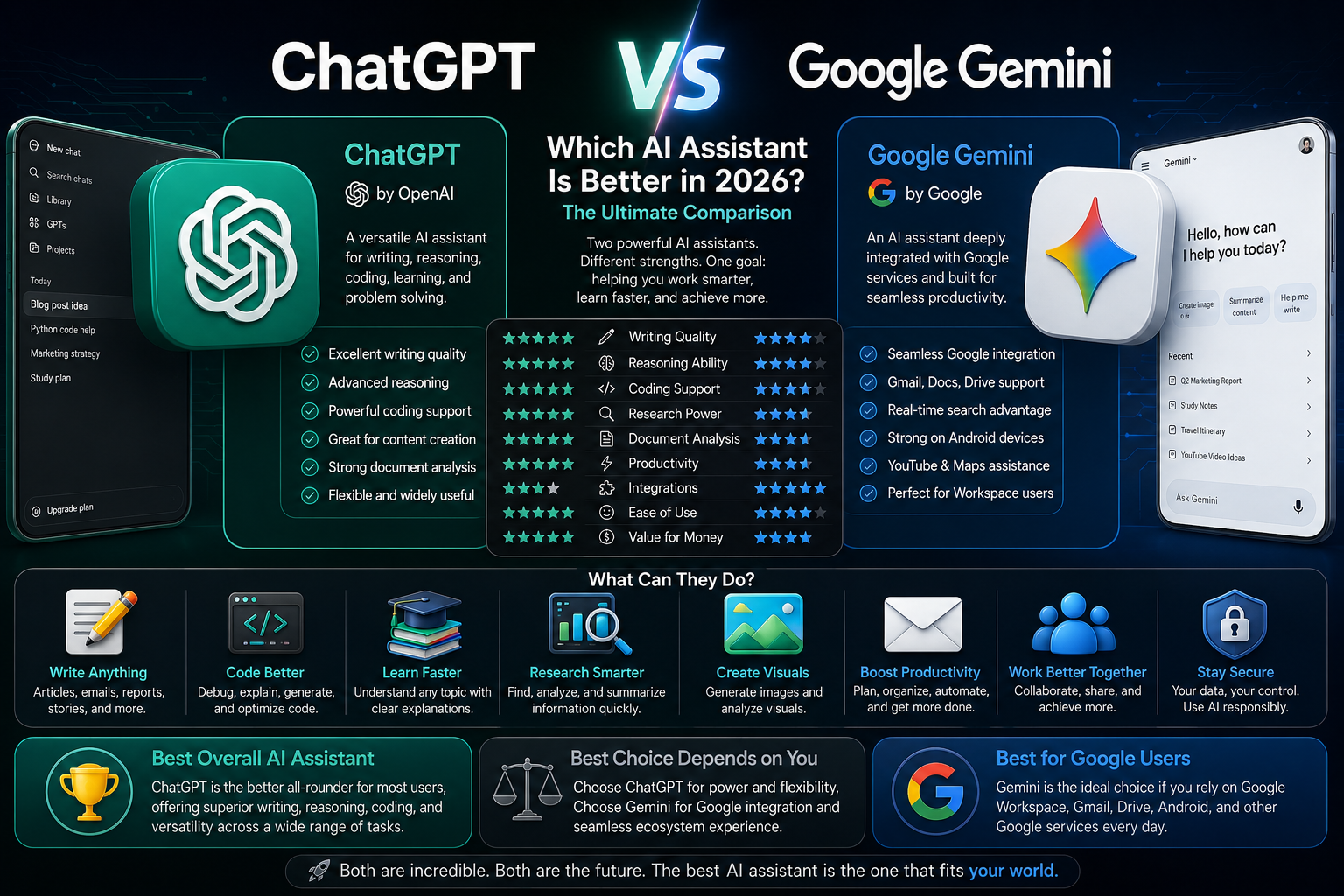
ChatGPT vs Google Gemini at a Glance
| Category | ChatGPT | Google Gemini |
|---|---|---|
| Developer | OpenAI | |
| Main Strength | Conversation, reasoning, writing, coding, productivity | Google ecosystem, search integration, Workspace support |
| Best For | Writing, analysis, brainstorming, coding, learning, complex tasks | Google users, research workflows, Gmail, Docs, Android, YouTube |
| User Experience | Very conversational and flexible | Search-connected and ecosystem-focused |
| Writing Quality | Excellent | Strong |
| Coding Help | Excellent | Strong |
| Research Support | Strong | Strong, especially with Google integration |
| Document Analysis | Excellent | Strong |
| Image Understanding | Excellent | Excellent |
| Image Generation | Strong | Strong |
| Productivity Use | Excellent | Excellent inside Google Workspace |
| Ecosystem Integration | Broad | Very strong with Google products |
| Best User Type | People who want a powerful general AI assistant | People deeply invested in Google services |
The Core Difference Between ChatGPT and Gemini
ChatGPT and Gemini are both AI assistants, but they are built around different strengths.
ChatGPT feels like a flexible thinking partner. It is often strong at understanding messy instructions, organizing ideas, writing in different tones, explaining complex concepts, helping with code, building plans, and improving drafts.
Gemini feels more connected to the internet and Google’s product universe. It becomes especially useful when the user wants AI assistance inside Google tools or when the task depends heavily on Google Search, Gmail, Docs, Drive, YouTube, or Android.
A simple way to understand the difference:
ChatGPT is often stronger as a general-purpose AI assistant.
Gemini is often stronger as a Google-connected AI assistant.
This difference matters because AI is no longer just a chatbot. It is becoming part of daily work systems.
Philosophy Comparison
| Factor | ChatGPT | Google Gemini |
|---|---|---|
| Main Design Philosophy | General AI assistant for thinking, writing, coding, and productivity | AI assistant deeply connected to Google services |
| Conversation Style | Natural, detailed, adaptive | Direct, search-oriented, ecosystem-aware |
| Best Workflow | Open-ended tasks and complex problem solving | Google Workspace and search-connected tasks |
| Strength | Depth and flexibility | Integration and access to Google tools |
| Weakness | Some features depend on plan and tool access | Can feel less flexible for certain creative or complex tasks |
| Ideal User | Writers, students, developers, professionals, creators | Google users, Android users, Workspace teams, search-heavy users |
Why This Comparison Matters in 2026
In 2026, AI assistants are no longer optional productivity tools for many people. They are becoming part of how people learn, work, write, code, search, plan, and communicate.
The choice between ChatGPT and Gemini can affect:
- How fast you complete work
- How well you write and communicate
- How efficiently you research topics
- How easily you manage documents
- How productive you are inside your existing apps
- How well you learn new skills
- How effectively you create content
- How confidently you make decisions
For businesses, the decision can affect team productivity.
For students, it can affect learning quality.
For developers, it can affect coding speed.
For content creators, it can affect output quality.
For professionals, it can affect daily workflow efficiency.
That is why choosing the right AI assistant is becoming similar to choosing the right laptop, smartphone, or productivity software.
User Interface and Ease of Use
The first impression of any AI assistant matters.
If the interface feels confusing, slow, or difficult to control, many users will not use the tool effectively.
ChatGPT is built around a clean conversation experience. Users can ask questions, refine answers, upload files, request edits, generate ideas, continue projects, and build workflows through natural conversation.
Gemini also offers a clean interface, but its biggest advantage comes when it connects with Google services. It can feel especially familiar for users who already live inside Gmail, Google Docs, Google Drive, YouTube, and Android.
Ease of Use Comparison
| Factor | ChatGPT | Google Gemini |
|---|---|---|
| Beginner Friendliness | Excellent | Excellent |
| Conversation Flow | Excellent | Strong |
| Task Continuity | Excellent | Strong |
| Interface Simplicity | Excellent | Excellent |
| Editing Drafts | Excellent | Strong |
| Search-Connected Tasks | Strong | Excellent |
| Google App Familiarity | Moderate | Excellent |
| Advanced Workflow Control | Excellent | Strong |
Practical User Experience
For a new user who simply wants to ask questions and get useful answers, both tools are easy to use.
However, ChatGPT often feels more like a writing and thinking workspace.
Gemini often feels more like an AI layer over the Google ecosystem.
This distinction becomes clearer with real examples.
Example Workflow Comparison
| Task | ChatGPT Experience | Gemini Experience |
|---|---|---|
| Write a long article | Strong structure, detailed drafting, strong rewriting | Good drafting, useful if connected to Google Docs |
| Summarize a topic | Detailed and organized | Strong, especially with search context |
| Plan a trip | Strong reasoning and itinerary planning | Strong with Google Maps/Search ecosystem |
| Analyze a document | Excellent if file tools are available | Strong with Google Drive integration |
| Draft emails | Excellent tone control | Strong inside Gmail |
| Research current information | Strong when browsing is available | Strong due to Google connection |
| Brainstorm business ideas | Excellent | Strong |
| Explain a difficult concept | Excellent | Strong |
Writing Quality
Writing is one of the most important uses of AI assistants.
People use AI to write:
- Blog posts
- Emails
- Reports
- Social media posts
- Product descriptions
- Scripts
- Essays
- Business proposals
- Marketing copy
- Website content
- Resume summaries
- Presentations
ChatGPT has built a strong reputation for writing quality because it can produce natural, structured, detailed, and adaptable text across many formats.
Gemini can also write well, especially for direct, clean, informational content. However, many users still prefer ChatGPT when they need longer, more polished, more nuanced writing.
Writing Comparison
| Writing Factor | ChatGPT | Google Gemini |
|---|---|---|
| Long-Form Writing | Excellent | Strong |
| Creative Writing | Excellent | Strong |
| Business Writing | Excellent | Strong |
| Email Drafting | Excellent | Excellent inside Gmail |
| Tone Control | Excellent | Strong |
| Rewriting Quality | Excellent | Strong |
| Blog Writing | Excellent | Strong |
| SEO Content | Strong | Strong |
| Human-Like Flow | Excellent | Strong |
| Editing and Refinement | Excellent | Strong |
Long-Form Content
Long-form content is where differences become more visible.
A strong article requires:
- Clear structure
- Logical flow
- Useful examples
- Internal consistency
- Depth
- Natural transitions
- Avoiding repetition
- Matching reader intent
ChatGPT often performs very well in this area because it can maintain a strong conversational structure and adapt tone based on instructions.
Gemini can also create long content, but ChatGPT is often preferred by writers, bloggers, marketers, and creators who need polished drafts and deep explanations.
Writing Use Case Scorecard
| Use Case | Better Choice |
|---|---|
| Long blog articles | ChatGPT |
| Email replies inside Gmail | Gemini |
| Creative storytelling | ChatGPT |
| Professional reports | ChatGPT |
| Google Docs workflow | Gemini |
| Rewriting text naturally | ChatGPT |
| Short summaries | Tie |
| SEO content drafts | ChatGPT |
| Social media captions | Tie |
| Marketing copy | ChatGPT |
Research and Information Gathering
Research is one of the most valuable AI use cases, but also one of the most sensitive.
A useful research assistant must be able to:
- Understand the question
- Identify relevant information
- Avoid misleading claims
- Summarize clearly
- Compare sources
- Explain uncertainty
- Help users think critically
Gemini has a natural advantage when tasks depend heavily on Google Search and Google’s information ecosystem.
ChatGPT can be excellent for research when web access, citations, files, or trusted sources are available, especially when the user needs interpretation rather than just information retrieval.
Research Comparison
| Research Factor | ChatGPT | Google Gemini |
|---|---|---|
| Search Integration | Strong when browsing is available | Excellent |
| Explanation Quality | Excellent | Strong |
| Source-Based Research | Strong | Strong |
| Summarization | Excellent | Strong |
| Critical Thinking | Excellent | Strong |
| Comparing Options | Excellent | Strong |
| Current Information | Depends on browsing/tool access | Strong due to Google connection |
| Research Organization | Excellent | Strong |
Research Accuracy and Caution
AI tools can make mistakes.
This is especially important for topics such as:
- Health
- Law
- Finance
- Politics
- Immigration
- Product prices
- Technical documentation
- Current events
Neither ChatGPT nor Gemini should be trusted blindly for high-stakes decisions.
The best approach is to use AI as a research assistant, not as the final authority.
For current facts, official sources should always be checked.
For complex decisions, expert advice may still be necessary.
Research Use Case Scorecard
| Research Task | Better Choice |
|---|---|
| Quick web-connected answers | Gemini |
| Deep explanation of a topic | ChatGPT |
| Comparing complex options | ChatGPT |
| Summarizing long material | ChatGPT |
| Finding Google-connected context | Gemini |
| Understanding pros and cons | ChatGPT |
| Academic-style explanation | ChatGPT |
| Current local information | Gemini |
| Turning research into content | ChatGPT |
Reasoning and Problem Solving
Reasoning is one of the most important areas for advanced AI assistants.
Users do not only want information. They want help thinking through problems.
This includes:
- Planning
- Decision-making
- Strategy
- Troubleshooting
- Analyzing trade-offs
- Explaining cause and effect
- Breaking down complex problems
- Creating step-by-step solutions
ChatGPT is often very strong in this area because it can hold a detailed conversation, refine assumptions, compare alternatives, and explain reasoning clearly.
Gemini can also reason well, especially when tasks involve information retrieval, Google tools, or structured answers.
Reasoning Comparison
| Reasoning Factor | ChatGPT | Google Gemini |
|---|---|---|
| Complex Problem Solving | Excellent | Strong |
| Strategic Planning | Excellent | Strong |
| Step-by-Step Explanations | Excellent | Strong |
| Trade-Off Analysis | Excellent | Strong |
| Brainstorming Alternatives | Excellent | Strong |
| Decision Frameworks | Excellent | Strong |
| Technical Troubleshooting | Excellent | Strong |
| Practical Recommendations | Excellent | Strong |
Practical Reasoning Examples
| Scenario | Better Choice |
|---|---|
| Build a business plan | ChatGPT |
| Compare two career paths | ChatGPT |
| Diagnose a software issue | ChatGPT |
| Plan a study schedule | ChatGPT |
| Research a local restaurant or route | Gemini |
| Summarize search results | Gemini |
| Create a decision matrix | ChatGPT |
| Analyze personal productivity problems | ChatGPT |
Coding and Development
Coding is one of the most powerful AI use cases.
Developers use AI assistants to:
- Write code
- Debug errors
- Explain programming concepts
- Generate scripts
- Review code
- Build small tools
- Understand documentation
- Convert code between languages
- Create tests
- Improve performance
ChatGPT is widely used by developers because of its ability to explain, debug, and generate code across many languages and frameworks.
Gemini is also strong, especially for developers working inside Google Cloud, Android development, and Google-related ecosystems.
Coding Comparison
| Coding Factor | ChatGPT | Google Gemini |
|---|---|---|
| Code Generation | Excellent | Strong |
| Debugging | Excellent | Strong |
| Explaining Code | Excellent | Strong |
| Python Help | Excellent | Strong |
| JavaScript Help | Excellent | Strong |
| Web Development | Excellent | Strong |
| Android Development | Strong | Excellent |
| Google Cloud Help | Strong | Excellent |
| Algorithm Explanation | Excellent | Strong |
| Code Refactoring | Excellent | Strong |
Coding Use Case Scorecard
| Developer Task | Better Choice |
|---|---|
| General programming help | ChatGPT |
| Debugging complex errors | ChatGPT |
| Android app development | Gemini |
| Google Cloud workflows | Gemini |
| Learning programming | ChatGPT |
| Writing small scripts | ChatGPT |
| Explaining algorithms | ChatGPT |
| Web development | ChatGPT |
| API troubleshooting | ChatGPT |
| Google ecosystem development | Gemini |
Early Verdict
ChatGPT and Gemini are both powerful AI assistants, but they shine in different environments.
ChatGPT is often stronger for users who need deep writing, reasoning, coding help, structured planning, creative thinking, and complex problem solving.
Gemini is especially strong for users who live inside the Google ecosystem and want AI connected to Search, Gmail, Docs, Drive, YouTube, Maps, Android, and Google Workspace.
For many users, the choice is not only about intelligence.
It is about workflow.
The best AI assistant is the one that fits naturally into the tools you already use every day.
Document Analysis and File Handling
One of the biggest shifts in AI usage during the past few years has been the move from simple chat interactions to document-centered workflows.
Today, people regularly upload:
- PDFs
- Research papers
- Business reports
- Contracts
- Spreadsheets
- Presentations
- Meeting notes
- Financial statements
- Academic materials
- Technical manuals
The quality of an AI assistant is increasingly determined by how well it can understand, summarize, analyze, compare, and extract information from these files.
For many professionals, students, consultants, researchers, and executives, document analysis is now more important than general conversation.
Document Analysis Comparison
| Factor | ChatGPT | Google Gemini |
|---|---|---|
| PDF Analysis | Excellent | Strong |
| Long Document Summaries | Excellent | Strong |
| Spreadsheet Interpretation | Excellent | Strong |
| Multi-File Analysis | Excellent | Strong |
| Data Extraction | Excellent | Strong |
| Report Generation | Excellent | Strong |
| Context Retention | Excellent | Strong |
| Google Drive Integration | Moderate | Excellent |
| Enterprise Document Workflows | Strong | Excellent |
| Deep Reasoning Over Documents | Excellent | Strong |
Real-World Example: Business Report Analysis
Imagine a company uploads a 150-page annual report and asks:
- What are the major risks?
- Which business segment grew the fastest?
- What changed compared to last year?
- Summarize the report for executives.
- Create an investor presentation outline.
This type of task requires more than simple summarization.
The AI must:
- Understand context
- Connect information across sections
- Identify trends
- Recognize priorities
- Generate useful outputs
This is where advanced reasoning becomes more important than simple search.
For many users, ChatGPT excels at transforming information into useful action plans, reports, and decision-making frameworks.
Gemini performs particularly well when those files already exist inside Google Drive and Workspace environments.
Educational Use and Learning
Education may become one of the most transformative uses of artificial intelligence.
Students increasingly use AI for:
- Studying
- Homework support
- Concept explanation
- Exam preparation
- Research assistance
- Language learning
- Note summarization
- Practice questions
However, the best AI assistant for learning is not necessarily the one that gives the fastest answer.
The best educational assistant helps users understand.
Learning Comparison
| Learning Factor | ChatGPT | Google Gemini |
|---|---|---|
| Concept Explanation | Excellent | Strong |
| Step-by-Step Teaching | Excellent | Strong |
| Personalized Learning | Excellent | Strong |
| Exam Preparation | Excellent | Strong |
| Study Plans | Excellent | Strong |
| Homework Assistance | Excellent | Strong |
| Research Support | Strong | Excellent |
| Interactive Learning | Excellent | Strong |
| Follow-Up Questions | Excellent | Strong |
| Critical Thinking Support | Excellent | Strong |
Why Explanation Quality Matters
Consider two AI responses:
Response A gives the answer.
Response B explains:
- Why the answer is correct
- Why alternatives are wrong
- Common mistakes
- Real-world applications
- Related concepts
The second approach creates deeper learning.
This is one reason many students use AI as a tutor rather than merely an answer generator.
Academic Research and Higher Education
University students, researchers, and graduate programs often require more advanced capabilities.
Tasks may include:
- Literature reviews
- Research synthesis
- Citation support
- Methodology analysis
- Academic writing
- Research planning
Academic Use Comparison
| Academic Factor | ChatGPT | Google Gemini |
|---|---|---|
| Literature Summaries | Excellent | Strong |
| Research Organization | Excellent | Strong |
| Methodology Explanation | Excellent | Strong |
| Academic Writing Support | Excellent | Strong |
| Research Brainstorming | Excellent | Strong |
| Complex Topic Explanation | Excellent | Strong |
| Search-Based Discovery | Strong | Excellent |
| Source Exploration | Strong | Excellent |
| Research Planning | Excellent | Strong |
| Knowledge Synthesis | Excellent | Strong |
Important Limitation
Neither ChatGPT nor Gemini should be used as an automatic source of academic truth.
Researchers should always verify:
- Citations
- Statistics
- Publication details
- Claims
- Scientific conclusions
AI works best as a research assistant, not a replacement for proper academic verification.
Business Strategy and Decision Support
Business professionals increasingly use AI for strategic thinking.
This includes:
- Market analysis
- Competitive analysis
- Product planning
- Pricing strategy
- Risk assessment
- Operational planning
- Customer research
Strategy Comparison
| Strategy Factor | ChatGPT | Google Gemini |
|---|---|---|
| Business Planning | Excellent | Strong |
| SWOT Analysis | Excellent | Strong |
| Market Analysis | Excellent | Strong |
| Competitive Analysis | Excellent | Strong |
| Strategic Frameworks | Excellent | Strong |
| Decision Trees | Excellent | Strong |
| Business Writing | Excellent | Strong |
| Executive Summaries | Excellent | Strong |
| Brainstorming | Excellent | Strong |
| Structured Recommendations | Excellent | Strong |
Why Many Professionals Prefer Conversational Strategy Tools
Strategic work is rarely linear.
A business owner may ask:
- Should I enter a new market?
- Should I hire more staff?
- Should I expand internationally?
- Which pricing model is best?
- How can I improve margins?
These questions often require exploration, refinement, and multiple iterations.
ChatGPT frequently performs well in these situations because it supports extended reasoning and iterative discussions.
Marketing and Content Creation
Marketing is one of the largest AI use cases worldwide.
Teams use AI for:
- Blog articles
- SEO content
- Advertising copy
- Product descriptions
- Email campaigns
- Landing pages
- Social media content
Marketing Comparison
| Marketing Factor | ChatGPT | Google Gemini |
|---|---|---|
| SEO Writing | Excellent | Strong |
| Content Planning | Excellent | Strong |
| Email Campaigns | Excellent | Strong |
| Ad Copy | Excellent | Strong |
| Product Descriptions | Excellent | Strong |
| Long-Form Articles | Excellent | Strong |
| Content Repurposing | Excellent | Strong |
| Marketing Strategy | Excellent | Strong |
| Audience Research | Strong | Strong |
| Creative Ideation | Excellent | Strong |
Long-Form Content Creation
Long-form content is particularly important for:
- Publishers
- Bloggers
- Affiliate marketers
- Agencies
- Media companies
These users often need:
- Structure
- Depth
- Topic coverage
- Internal consistency
- Human-like flow
Because of this, many content creators prioritize writing quality over simple search integration.
Creativity and Idea Generation
Creativity is one of the most difficult capabilities to evaluate.
A useful AI assistant should help generate:
- New ideas
- New perspectives
- Alternative solutions
- Creative concepts
- Business opportunities
- Story frameworks
Creativity Comparison
| Creative Factor | ChatGPT | Google Gemini |
|---|---|---|
| Brainstorming | Excellent | Strong |
| Story Ideas | Excellent | Strong |
| Content Ideas | Excellent | Strong |
| Product Ideas | Excellent | Strong |
| Naming Suggestions | Excellent | Strong |
| Creative Writing | Excellent | Strong |
| Campaign Concepts | Excellent | Strong |
| Scenario Planning | Excellent | Strong |
| Idea Expansion | Excellent | Strong |
| Iterative Creativity | Excellent | Strong |
Why Creativity Matters
Many users do not need facts.
They need possibilities.
Examples include:
- Entrepreneurs looking for opportunities
- Marketers creating campaigns
- Authors building stories
- Product managers designing features
- Educators creating lessons
In these situations, the ability to expand ideas becomes more valuable than simply retrieving information.
Productivity and Workflow Automation
The best AI assistant is often the one that saves the most time.
Modern professionals use AI to:
- Organize tasks
- Draft emails
- Create reports
- Summarize meetings
- Build presentations
- Manage projects
Productivity Comparison
| Productivity Factor | ChatGPT | Google Gemini |
|---|---|---|
| General Productivity | Excellent | Excellent |
| Task Planning | Excellent | Strong |
| Meeting Summaries | Excellent | Strong |
| Workflow Creation | Excellent | Strong |
| Report Generation | Excellent | Strong |
| Email Drafting | Excellent | Excellent |
| Google Workspace Integration | Moderate | Excellent |
| Project Planning | Excellent | Strong |
| Actionable Recommendations | Excellent | Strong |
| Cross-Domain Usefulness | Excellent | Strong |
The Productivity Question Most Users Miss
The best AI is not necessarily the one with the highest benchmark score.
The best AI is often the one that saves you the most hours per week.
For example:
A writer may save ten hours weekly with better drafting.
A programmer may save ten hours through debugging support.
A business owner may save hours through faster planning.
A student may save hours through tutoring and summarization.
The value of an AI assistant is often measured in time, not technology.
Enterprise and Team Adoption
Organizations increasingly evaluate AI tools for entire teams rather than individual users.
Important considerations include:
- Security
- Compliance
- Collaboration
- Integration
- Scalability
Enterprise Comparison
| Enterprise Factor | ChatGPT | Google Gemini |
|---|---|---|
| Team Productivity | Excellent | Excellent |
| Enterprise Adoption | Strong | Strong |
| Collaboration | Strong | Excellent within Workspace |
| Security Controls | Strong | Strong |
| Workflow Integration | Strong | Excellent |
| Document Ecosystem | Strong | Excellent |
| Scalability | Excellent | Excellent |
| Business Deployment | Strong | Excellent |
| Internal Knowledge Work | Excellent | Strong |
| Enterprise Value | Excellent | Excellent |
Organizations already operating heavily inside Google Workspace may naturally lean toward Gemini.
Organizations focused on broad productivity, writing, coding, planning, and knowledge work often find ChatGPT highly attractive.
Mid-Article Assessment
At this stage of the comparison, a pattern is becoming increasingly clear.
ChatGPT consistently excels in:
- Writing
- Reasoning
- Coding
- Planning
- Strategy
- Creativity
- Teaching
- Long-form content
- Knowledge synthesis
Gemini consistently excels in:
- Google integration
- Search-connected workflows
- Workspace productivity
- Google Drive workflows
- Gmail assistance
- Android ecosystem connectivity
- Information discovery
The most important takeaway is that these assistants are increasingly becoming productivity platforms rather than simple chatbots.
The best choice depends less on raw intelligence and more on how well the AI integrates into the way you already work.
Image Generation and Visual Creativity
AI assistants are no longer limited to text. Visual creation has become one of the most important parts of modern AI platforms, especially for marketers, bloggers, designers, teachers, small business owners, social media managers, and content creators.
People now use AI image tools to create:
- Blog featured images
- Social media graphics
- Product concepts
- Advertising visuals
- Presentation images
- Educational illustrations
- Storyboards
- YouTube thumbnails
- Website banners
- Brand mood boards
This makes image generation an important part of the ChatGPT vs Gemini comparison.
Image Generation Comparison
| Visual Feature | ChatGPT | Google Gemini |
|---|---|---|
| Creative Image Prompts | Excellent | Strong |
| Image Generation Quality | Excellent | Strong |
| Image Editing Support | Strong | Strong |
| Brand Concept Creation | Excellent | Strong |
| Blog Image Ideas | Excellent | Strong |
| Marketing Visual Concepts | Excellent | Strong |
| Infographic Planning | Excellent | Strong |
| Visual Brainstorming | Excellent | Strong |
| Text-to-Image Workflow | Strong | Strong |
| Practical Creative Direction | Excellent | Strong |
Where ChatGPT Is Strong for Visual Work
ChatGPT is especially useful before the image is created.
It can help users develop:
- Image concepts
- Prompt structure
- Composition ideas
- Color direction
- Visual hierarchy
- Brand style
- Text placement
- Thumbnail ideas
- Article image briefs
This is valuable because many people do not struggle only with generating images. They struggle with knowing what image they should create.
For example, a blogger writing a comparison article may need a featured image that is clear, clickable, readable, and safe from cropping in different website layouts.
A good AI assistant should not only generate a picture. It should help design the visual strategy behind the picture.
Image Understanding and Analysis
Another important visual feature is image understanding.
Users increasingly upload screenshots, charts, photos, diagrams, product images, receipts, forms, and website screenshots to ask for analysis.
This is useful for:
- Explaining charts
- Reviewing website design
- Understanding documents
- Extracting visual information
- Comparing product images
- Troubleshooting app screens
- Reading interface problems
- Giving design feedback
Image Understanding Comparison
| Image Analysis Task | ChatGPT | Google Gemini |
|---|---|---|
| Screenshot Explanation | Excellent | Strong |
| Chart Interpretation | Excellent | Strong |
| Visual Design Feedback | Excellent | Strong |
| Product Image Analysis | Strong | Strong |
| Document Screenshot Review | Excellent | Strong |
| UI/UX Feedback | Excellent | Strong |
| Infographic Review | Excellent | Strong |
| Visual Problem Solving | Excellent | Strong |
Real-World Example: Website Image Review
A website owner may upload a screenshot and ask:
- Why does the image look cropped?
- Is the text readable?
- Does the design look professional?
- Is the layout suitable for mobile?
- What should be improved?
This type of task requires visual understanding, design judgment, and practical website awareness.
ChatGPT is often particularly useful in these situations because it can combine visual analysis with written recommendations, SEO thinking, and publishing workflow advice.
Voice Features and Natural Conversation
Voice interaction is becoming a major part of AI assistants.
Many users do not want to type long prompts. They want to speak naturally, ask follow-up questions, brainstorm ideas, learn languages, practice interviews, or discuss problems in real time.
Voice AI is especially useful for:
- Language learning
- Interview practice
- Studying while walking
- Brainstorming ideas
- Accessibility
- Hands-free productivity
- Explaining topics out loud
- Practicing presentations
Voice Feature Comparison
| Voice Feature | ChatGPT | Google Gemini |
|---|---|---|
| Natural Conversation | Excellent | Strong |
| Language Practice | Excellent | Strong |
| Real-Time Discussion | Excellent | Strong |
| Interview Practice | Excellent | Strong |
| Hands-Free Help | Strong | Strong |
| Accessibility Use | Strong | Strong |
| Mobile Voice Assistant Use | Strong | Excellent on Android |
| Emotional Naturalness | Excellent | Strong |
Why Voice Quality Matters
Voice AI is different from text AI.
In text, users can tolerate slower responses and more formal wording.
In voice, the assistant must feel natural, fast, and conversational. It must understand interruptions, follow-up questions, unclear phrasing, and changing context.
This makes voice quality important for people who use AI as a tutor, coach, language partner, or brainstorming assistant.
Mobile App Experience
Since both ChatGPT and Gemini are heavily used on smartphones, mobile app quality matters.
A strong AI mobile app should be:
- Fast
- Simple
- Reliable
- Easy to use
- Good with voice
- Good with images
- Good with files
- Helpful for quick tasks
Mobile Experience Comparison
| Mobile Factor | ChatGPT | Google Gemini |
|---|---|---|
| Mobile App Simplicity | Excellent | Strong |
| Voice Use | Excellent | Strong |
| Image Uploads | Excellent | Strong |
| File Work | Excellent | Strong |
| Android Integration | Moderate | Excellent |
| iPhone Experience | Excellent | Strong |
| Quick Answers | Excellent | Excellent |
| Daily Productivity | Excellent | Strong |
| Assistant Replacement Potential | Strong | Excellent on Android |
Gemini’s Android Advantage
Gemini has a major advantage on Android because it is directly connected to Google’s mobile ecosystem.
This makes it useful for:
- Android phone assistance
- Google app workflows
- Search-connected tasks
- Maps-related questions
- Gmail and Calendar support
- YouTube-related discovery
- Mobile productivity
For Android users, Gemini may feel more naturally embedded into the phone experience.
ChatGPT’s Cross-Platform Advantage
ChatGPT is strong because it works well across many environments.
It is useful on:
- iPhone
- Android
- Web browsers
- Desktop workflows
- Writing projects
- Coding sessions
- Research tasks
- Content creation pipelines
Instead of being tied mainly to one ecosystem, ChatGPT functions more like a general AI workspace.
Accuracy, Hallucinations, and Trust
Accuracy is one of the most important issues in artificial intelligence.
AI assistants can produce incorrect answers confidently. This problem is often called hallucination.
It can happen when the AI:
- Misremembers facts
- Invents details
- Mixes outdated information with current information
- Misinterprets a question
- Overgeneralizes from incomplete context
- Fails to verify a claim
This matters because users increasingly rely on AI for serious tasks.
Accuracy Risk Comparison
| Accuracy Factor | ChatGPT | Google Gemini |
|---|---|---|
| General Knowledge Accuracy | Strong | Strong |
| Current Information | Strong with browsing | Strong with Google connection |
| Source-Based Answers | Strong when sources are used | Strong |
| Complex Reasoning Accuracy | Excellent | Strong |
| Risk of Confident Errors | Exists | Exists |
| Need for Verification | Yes | Yes |
| Best Used With Official Sources | Yes | Yes |
High-Risk Topics That Require Verification
Users should be careful when using any AI assistant for:
| Topic | Why Verification Matters |
|---|---|
| Medical Advice | Health decisions can be serious |
| Legal Questions | Laws vary by country and change over time |
| Immigration Rules | Policies change frequently |
| Financial Decisions | Mistakes can cause real losses |
| Product Prices | Prices change constantly |
| Current Events | News develops quickly |
| Academic Citations | AI may misstate or invent references |
| Technical Documentation | Software updates can change details |
Best Practice for Reliable AI Use
The safest way to use AI is to combine speed with verification.
A practical workflow is:
| Step | Action |
|---|---|
| 1 | Ask the AI to explain the topic |
| 2 | Ask for assumptions and limitations |
| 3 | Request a structured comparison |
| 4 | Verify important claims with official sources |
| 5 | Use the AI to summarize verified information |
| 6 | Make the final decision yourself |
This approach gives users the productivity benefit of AI without blindly trusting every answer.
Data Privacy and Sensitive Information
Privacy matters because users often paste personal or business information into AI assistants.
This may include:
- Emails
- Contracts
- Customer data
- Financial details
- Internal company plans
- Legal documents
- Academic research
- Personal messages
Before using any AI assistant, users should understand what kind of information they are sharing.
Privacy Use Comparison
| Privacy Need | ChatGPT | Google Gemini |
|---|---|---|
| Personal Productivity | Strong | Strong |
| Business Documents | Strong | Strong |
| Enterprise Controls | Strong | Strong |
| Google Account Integration | Moderate | Excellent |
| Sensitive Data Caution Needed | Yes | Yes |
| User Control Importance | High | High |
Practical Privacy Rules
Users should avoid sharing:
- Passwords
- Banking credentials
- Private identification numbers
- Confidential client data
- Sensitive legal documents without permission
- Medical records unless absolutely necessary
- Company secrets in unmanaged accounts
AI tools can be extremely useful, but they should be treated like powerful cloud services, not private notebooks.
Pricing and Value
Pricing is not only about monthly subscription cost.
The real question is:
How much value does the tool create?
A paid AI assistant can be worth it if it helps a user save time, earn more money, improve work quality, or learn faster.
Value Comparison
| User Type | ChatGPT Value | Gemini Value |
|---|---|---|
| Student | Excellent | Strong |
| Writer | Excellent | Strong |
| Developer | Excellent | Strong |
| Marketer | Excellent | Strong |
| Business Owner | Excellent | Strong |
| Google Workspace User | Strong | Excellent |
| Android User | Strong | Excellent |
| Researcher | Excellent | Strong |
| Content Creator | Excellent | Strong |
| Casual User | Strong | Strong |
How to Think About AI Subscription Value
A monthly AI subscription may be worth it if it helps you:
- Write faster
- Study better
- Code more efficiently
- Create content consistently
- Save work hours
- Improve decision-making
- Reduce repetitive tasks
- Produce higher-quality output
For example, if an AI assistant saves five hours per month, the value may already exceed the subscription cost for many professionals.
For creators, business owners, and students, the return can be much higher.
Weaknesses of ChatGPT
Even though ChatGPT is powerful, it is not perfect.
Common limitations include:
- It can still make factual mistakes.
- Some current information requires browsing or verification.
- Output quality depends heavily on the user’s instructions.
- It may sometimes provide long answers when shorter ones are needed.
- Some advanced features may require paid access.
- It can occasionally over-explain simple tasks.
Weaknesses of Gemini
Gemini also has limitations.
Common limitations include:
- It may feel less flexible in some creative workflows.
- Long-form writing may require more editing.
- Some responses may feel more search-like than deeply analytical.
- Its biggest advantages depend heavily on Google ecosystem usage.
- It can still make factual errors.
- Some advanced integrations may depend on account settings or region.
Strengths Summary
| Strength Area | ChatGPT | Gemini |
|---|---|---|
| Deep Writing | Excellent | Strong |
| Reasoning | Excellent | Strong |
| Coding | Excellent | Strong |
| Creativity | Excellent | Strong |
| Google Integration | Moderate | Excellent |
| Search Workflows | Strong | Excellent |
| Document Thinking | Excellent | Strong |
| Workspace Productivity | Strong | Excellent |
| Voice Conversation | Excellent | Strong |
| Android Integration | Moderate | Excellent |
Practical Buying Guide
The best AI assistant is not simply the one with the most features. It is the one that fits your workflow and helps you produce better results faster.
Choose ChatGPT If You Mostly Need
| Need | Why ChatGPT Fits |
|---|---|
| Long-form writing | Strong structure and natural flow |
| Content creation | Excellent brainstorming and drafting |
| Coding help | Strong explanations and debugging |
| Business planning | Clear strategy and decision frameworks |
| Learning support | Strong tutoring and step-by-step explanations |
| Complex reasoning | Excellent trade-off analysis |
| Creative work | Strong ideation and refinement |
| Document interpretation | Strong summarization and synthesis |
Choose Gemini If You Mostly Need
| Need | Why Gemini Fits |
|---|---|
| Google Workspace support | Strong Gmail, Docs, Drive, and Calendar connection |
| Android integration | Better built into Google mobile ecosystem |
| Search-heavy tasks | Strong connection to Google information workflows |
| YouTube-related discovery | Natural advantage through Google ecosystem |
| Google Docs drafting | Useful inside document workflows |
| Google account productivity | Better ecosystem alignment |
| Quick web-connected assistance | Strong search-oriented workflow |
Balanced Recommendation
For most users who want the strongest general AI assistant for writing, reasoning, learning, coding, content creation, and complex problem solving, ChatGPT is usually the better choice.
For users who live inside Google Workspace, use Android heavily, depend on Gmail and Docs daily, and want AI deeply connected to Google services, Gemini may be the more convenient choice.
The strongest productivity setup for advanced users may eventually involve both tools, but if choosing only one, the decision should be based on daily workflow rather than brand loyalty.
Performance Benchmarks vs Real-World Performance
One of the most common mistakes people make when comparing AI assistants is focusing too heavily on benchmark scores.
Benchmarks can be useful because they provide measurable ways to compare models. However, real-world productivity is often very different from benchmark performance.
A model may achieve excellent scores in controlled tests yet feel less useful during everyday work.
Likewise, a model may not lead every benchmark but still provide a better user experience.
This distinction is becoming increasingly important as AI systems become more capable.
Benchmark Performance vs Practical Performance
| Evaluation Area | ChatGPT | Gemini |
|---|---|---|
| Benchmark Performance | Excellent | Excellent |
| Real-World Writing | Excellent | Strong |
| Real-World Research | Excellent | Strong |
| Real-World Productivity | Excellent | Strong |
| Long Conversations | Excellent | Strong |
| Context Retention | Excellent | Strong |
| Task Adaptability | Excellent | Strong |
| Professional Use Cases | Excellent | Strong |
Why Benchmarks Don’t Tell the Full Story
Imagine two AI systems.
One solves technical benchmark questions exceptionally well.
The other helps users:
- Write reports
- Build presentations
- Learn new skills
- Analyze documents
- Make decisions
- Solve daily work problems
For most users, the second system may feel more valuable even if benchmark scores are similar.
The real measure of an AI assistant is not how well it performs in a laboratory test.
The real measure is how much useful work it helps users complete.
Context Window and Long Conversations
As AI becomes more sophisticated, conversations are becoming longer.
Users increasingly expect AI to:
- Remember earlier discussion points
- Understand complex projects
- Work across multiple documents
- Continue tasks over time
- Maintain consistency
This ability is often referred to as context management.
Context Handling Comparison
| Context Factor | ChatGPT | Gemini |
|---|---|---|
| Long Conversations | Excellent | Strong |
| Multi-Step Projects | Excellent | Strong |
| Instruction Retention | Excellent | Strong |
| Complex Workflows | Excellent | Strong |
| Project Continuity | Excellent | Strong |
| Context Organization | Excellent | Strong |
| Multi-Document Reasoning | Excellent | Strong |
| Consistency Over Time | Excellent | Strong |
Why Context Matters
Consider a user creating:
- A 10,000-word report
- A software project
- A marketing campaign
- A research paper
- A business plan
The AI assistant must maintain consistency across many interactions.
This capability often becomes more important than individual answers.
The better the AI manages context, the more useful it becomes for serious work.
Personal Productivity Systems
The most advanced users no longer use AI for isolated tasks.
Instead, they build productivity systems around AI.
Examples include:
- Daily planning
- Meeting preparation
- Learning systems
- Content pipelines
- Research workflows
- Business operations
- Project management
Productivity System Comparison
| Productivity Area | ChatGPT | Gemini |
|---|---|---|
| Daily Planning | Excellent | Strong |
| Goal Tracking | Excellent | Strong |
| Project Planning | Excellent | Strong |
| Workflow Design | Excellent | Strong |
| Knowledge Management | Excellent | Strong |
| Content Pipelines | Excellent | Strong |
| Learning Systems | Excellent | Strong |
| Strategic Planning | Excellent | Strong |
Example: Content Creation Workflow
A content creator might use AI to:
- Research topics.
- Generate outlines.
- Draft articles.
- Improve SEO.
- Create social content.
- Generate image ideas.
- Repurpose content.
This type of workflow requires multiple capabilities working together.
The stronger the workflow support, the greater the productivity gain.
Business ROI: Measuring AI Value
Businesses increasingly ask a simple question:
What return on investment does AI generate?
This question matters because organizations are spending significant amounts on AI tools.
The value comes from:
- Faster work
- Reduced repetitive tasks
- Better decision making
- Increased output
- Improved quality
- Lower operational costs
Business ROI Comparison
| ROI Area | ChatGPT | Gemini |
|---|---|---|
| Content Production | Excellent | Strong |
| Knowledge Work | Excellent | Strong |
| Team Productivity | Excellent | Strong |
| Report Generation | Excellent | Strong |
| Research Efficiency | Excellent | Strong |
| Meeting Preparation | Excellent | Strong |
| Customer Support Assistance | Strong | Strong |
| Process Optimization | Excellent | Strong |
Example ROI Scenario
Suppose a professional saves:
- 30 minutes per day
- 5 days per week
- 50 weeks per year
That equals approximately:
- 125 hours saved annually
For many professionals, that time value alone can justify the cost of an AI subscription.
The most successful AI users focus on time savings rather than technology itself.
Small Business Applications
Small businesses are among the biggest beneficiaries of AI.
Unlike large corporations, small businesses often have limited staff and limited budgets.
AI can function as:
- Research assistant
- Content writer
- Marketing assistant
- Planning advisor
- Customer communication helper
- Productivity partner
Small Business Comparison
| Business Function | ChatGPT | Gemini |
|---|---|---|
| Marketing | Excellent | Strong |
| Blog Content | Excellent | Strong |
| Customer Emails | Excellent | Strong |
| Business Planning | Excellent | Strong |
| Research | Excellent | Strong |
| Social Media | Excellent | Strong |
| Proposal Writing | Excellent | Strong |
| Process Documentation | Excellent | Strong |
Many small businesses report that AI allows them to operate as if they had additional team members.
Enterprise Knowledge Management
Large organizations face a different challenge.
Their problem is often not lack of information.
Their problem is too much information.
AI can help organizations:
- Search knowledge bases
- Summarize reports
- Analyze documentation
- Improve internal communication
- Reduce information overload
Enterprise Knowledge Comparison
| Enterprise Function | ChatGPT | Gemini |
|---|---|---|
| Knowledge Search | Strong | Strong |
| Internal Documentation | Excellent | Strong |
| Information Synthesis | Excellent | Strong |
| Executive Briefings | Excellent | Strong |
| Report Summaries | Excellent | Strong |
| Knowledge Extraction | Excellent | Strong |
| Strategic Insights | Excellent | Strong |
| Decision Support | Excellent | Strong |
As organizations generate more data, knowledge management becomes one of AI’s most valuable use cases.
Multimodal Capabilities
Modern AI assistants are evolving beyond text.
Users increasingly expect AI to work across:
- Text
- Images
- Documents
- Audio
- Video
- Screenshots
- Charts
This is often referred to as multimodal intelligence.
Multimodal Comparison
| Capability | ChatGPT | Gemini |
|---|---|---|
| Text Understanding | Excellent | Excellent |
| Image Understanding | Excellent | Excellent |
| Document Analysis | Excellent | Strong |
| Screenshot Interpretation | Excellent | Strong |
| Chart Analysis | Excellent | Strong |
| Visual Reasoning | Excellent | Strong |
| Cross-Format Workflows | Excellent | Strong |
| Multimodal Productivity | Excellent | Strong |
The future of AI will likely be increasingly multimodal.
The most useful assistants will understand information regardless of format.
AI Adoption Trends
The AI market is evolving rapidly.
Users are moving beyond experimentation.
They now rely on AI daily for meaningful work.
Current adoption trends show growing use in:
| Industry | Common AI Uses |
|---|---|
| Education | Tutoring, research, study support |
| Marketing | Content creation, campaigns |
| Software Development | Coding, debugging |
| Finance | Analysis, reporting |
| Healthcare | Documentation support |
| Legal | Research assistance |
| Media | Writing and production |
| Consulting | Analysis and presentations |
This shift indicates that AI assistants are becoming infrastructure rather than optional tools.
What Matters Most in 2026?
The AI conversation has evolved.
A few years ago, users asked:
- Can AI answer questions?
Today users ask:
- Can AI improve my workflow?
- Can AI save time?
- Can AI help me earn more?
- Can AI improve my decisions?
- Can AI increase my productivity?
This is a fundamentally different standard.
The best AI assistant is no longer the one that gives the smartest answer.
The best AI assistant is the one that creates the most value.
Value Creation Comparison
| Value Area | ChatGPT | Gemini |
|---|---|---|
| Writing Value | Excellent | Strong |
| Research Value | Excellent | Strong |
| Learning Value | Excellent | Strong |
| Coding Value | Excellent | Strong |
| Productivity Value | Excellent | Strong |
| Business Value | Excellent | Strong |
| Creative Value | Excellent | Strong |
| Ecosystem Value | Strong | Excellent |
Strategic Perspective
When viewed through the lens of practical productivity, the competition becomes less about model intelligence and more about workflow alignment.
Users who spend most of their time creating, analyzing, planning, writing, coding, teaching, researching, and building projects often prioritize depth, reasoning quality, and adaptability.
Users who spend most of their time inside Google’s ecosystem often prioritize integration, convenience, and seamless workflow support.
The AI market is becoming increasingly competitive, but one thing is clear:
The future belongs to assistants that can transform information into action, not merely provide answers.
Final Verdict: ChatGPT vs Google Gemini in 2026
After comparing writing quality, reasoning ability, research workflows, coding support, document analysis, productivity systems, creativity, business applications, education, multimodal capabilities, enterprise adoption, ecosystem integration, and long-term value, we can finally answer the central question:
Which AI assistant is better in 2026?
The answer depends on what “better” means.
If better means stronger writing, deeper reasoning, superior planning, better coding support, stronger long-form content creation, more advanced learning assistance, and greater flexibility across different types of work, ChatGPT is generally the stronger choice.
If better means tighter integration with Google’s ecosystem, better Workspace connectivity, stronger Android integration, and seamless interaction with Gmail, Docs, Drive, Maps, YouTube, and Search, Gemini has a clear advantage.
The reality is that both platforms represent the highest tier of consumer AI available today.
The difference is no longer about whether either tool is good.
The difference is about which one creates more value for the way you work.
Overall Comparison Scorecard
| Category | Winner |
|---|---|
| Long-Form Writing | ChatGPT |
| Content Creation | ChatGPT |
| Reasoning | ChatGPT |
| Strategic Thinking | ChatGPT |
| Coding Assistance | ChatGPT |
| Teaching and Learning | ChatGPT |
| Brainstorming | ChatGPT |
| Creativity | ChatGPT |
| Document Analysis | ChatGPT |
| Workflow Flexibility | ChatGPT |
| Google Workspace Integration | Gemini |
| Gmail Integration | Gemini |
| Google Docs Integration | Gemini |
| Google Drive Integration | Gemini |
| Android Ecosystem | Gemini |
| Google Search Workflow | Gemini |
| YouTube Integration | Gemini |
| Google Maps Integration | Gemini |
Total Assessment
While Gemini performs exceptionally well in ecosystem-driven workflows, ChatGPT generally demonstrates broader strengths across a larger number of professional, educational, creative, and analytical use cases.
This makes ChatGPT the stronger general-purpose AI assistant for most users.
Best AI Assistant for Students
Students increasingly rely on AI for:
- Understanding concepts
- Creating study plans
- Exam preparation
- Summarizing notes
- Practicing questions
- Learning new subjects
Student Comparison
| Student Need | Better Choice |
|---|---|
| Understanding Difficult Topics | ChatGPT |
| Personalized Explanations | ChatGPT |
| Exam Preparation | ChatGPT |
| Research Assistance | ChatGPT |
| Study Planning | ChatGPT |
| Google Classroom Workflows | Gemini |
| Google Docs Assignments | Gemini |
Recommendation
For most students, ChatGPT offers the more complete learning experience because of its ability to explain concepts deeply and adapt explanations to different learning styles.
Best AI Assistant for Content Creators
Content creators need:
- Ideas
- Writing
- Research
- Editing
- SEO support
- Content repurposing
Creator Comparison
| Creator Task | Better Choice |
|---|---|
| Blog Writing | ChatGPT |
| SEO Content | ChatGPT |
| Social Media Ideas | ChatGPT |
| Video Scripts | ChatGPT |
| Content Planning | ChatGPT |
| Creative Brainstorming | ChatGPT |
| Google-Based Research | Gemini |
Recommendation
Content creators generally benefit more from ChatGPT because of its writing quality and ability to maintain long-form structure.
Best AI Assistant for Developers
Developers increasingly use AI every day.
Common use cases include:
- Writing code
- Debugging
- Learning frameworks
- Understanding APIs
- Building projects
- Reviewing code
Developer Comparison
| Developer Need | Better Choice |
|---|---|
| Coding Assistance | ChatGPT |
| Debugging | ChatGPT |
| Code Explanation | ChatGPT |
| Learning Programming | ChatGPT |
| Algorithm Understanding | ChatGPT |
| Android Development | Gemini |
| Google Cloud Workflows | Gemini |
Recommendation
For most developers, ChatGPT remains the stronger programming assistant.
Developers heavily invested in Android and Google Cloud environments may find Gemini particularly useful.
Best AI Assistant for Business Professionals
Business professionals often prioritize:
- Productivity
- Planning
- Communication
- Research
- Reporting
Professional Comparison
| Professional Task | Better Choice |
|---|---|
| Business Planning | ChatGPT |
| Strategic Analysis | ChatGPT |
| Report Writing | ChatGPT |
| Executive Summaries | ChatGPT |
| Meeting Preparation | ChatGPT |
| Gmail-Based Productivity | Gemini |
| Workspace Collaboration | Gemini |
Recommendation
Professionals who regularly analyze information, create reports, and make decisions will often gain greater value from ChatGPT.
Best AI Assistant for Researchers
Researchers require:
- Information synthesis
- Critical analysis
- Topic exploration
- Research planning
Research Comparison
| Research Task | Better Choice |
|---|---|
| Research Synthesis | ChatGPT |
| Literature Understanding | ChatGPT |
| Complex Topic Analysis | ChatGPT |
| Knowledge Organization | ChatGPT |
| Search Discovery | Gemini |
| Google-Based Information Retrieval | Gemini |
Recommendation
Researchers often use both tools, but ChatGPT is generally stronger for interpreting and organizing information once it has been collected.
Best AI Assistant for Small Business Owners
Small businesses often need an AI assistant that can act as:
- Marketing assistant
- Writer
- Analyst
- Planner
- Productivity partner
Small Business Comparison
| Business Function | Better Choice |
|---|---|
| Marketing Strategy | ChatGPT |
| Content Creation | ChatGPT |
| Business Planning | ChatGPT |
| Customer Communication | ChatGPT |
| Research | ChatGPT |
| Workspace Coordination | Gemini |
Recommendation
For most small business owners, ChatGPT offers broader value because it covers more business functions effectively.
Best AI Assistant for Google Users
This is where Gemini becomes especially compelling.
Users who spend most of their day inside:
- Gmail
- Google Docs
- Google Drive
- Google Calendar
- Google Maps
- Android
- Google Workspace
may experience significant convenience from Gemini’s deeper integrations.
Ecosystem Comparison
| Ecosystem Area | Better Choice |
|---|---|
| Gmail | Gemini |
| Docs | Gemini |
| Drive | Gemini |
| Calendar | Gemini |
| Maps | Gemini |
| Android | Gemini |
| Search Workflows | Gemini |
Recommendation
If your digital life revolves around Google services, Gemini can feel more natural and efficient.
Which AI Assistant Will Improve Faster?
One of the most interesting questions is not which assistant is better today.
The question is:
Which assistant will improve the fastest?
Both OpenAI and Google are investing billions of dollars into AI development.
Areas likely to improve include:
- Reasoning
- Personalization
- Voice interaction
- Agent capabilities
- Automation
- Research
- Multimodal understanding
- Productivity integration
Because both companies possess enormous resources, the competition is likely to remain intense for years.
Users will ultimately benefit from this rivalry.
Common Mistakes When Choosing an AI Assistant
Mistake #1: Choosing Based on Brand
Many people choose an AI assistant because of the company behind it.
A better approach is to evaluate which tool helps you accomplish your goals more effectively.
Mistake #2: Focusing Only on Benchmarks
Benchmarks matter, but practical productivity matters more.
The best AI assistant is the one that improves your daily work.
Mistake #3: Ignoring Workflow Fit
Even the most advanced AI can feel disappointing if it does not fit naturally into your workflow.
Mistake #4: Expecting Perfect Accuracy
AI assistants are powerful but imperfect.
Verification remains important.
Mistake #5: Using AI Passively
The greatest benefits come from users who actively collaborate with AI rather than simply asking one-off questions.
Related Articles
- ChatGPT vs Claude vs Gemini: Which AI Assistant Is Best in 2026?
- ChatGPT vs Claude vs Gemini vs Perplexity (2026): The Ultimate AI Comparison Guide
- Best AI Tools to Make Money Online in 2026
- How to Make Passive Income With AI in 2026
- Best Skills to Learn in 2026
- Best Remote Jobs That Pay Well in 2026
- Best Online Businesses to Start in 2026
Conclusion
The AI industry has reached a point where the best tools are no longer judged solely by intelligence.
They are judged by usefulness.
ChatGPT excels as a versatile AI partner capable of writing, reasoning, teaching, coding, analyzing, planning, brainstorming, and helping users solve complex problems across virtually any domain.
Gemini excels as an AI assistant deeply integrated into the Google ecosystem, providing exceptional convenience for users whose work revolves around Google’s products and services.
For most users seeking a single AI assistant capable of handling the widest range of professional, educational, creative, and analytical tasks, ChatGPT is currently the stronger overall choice.
For users who spend most of their time inside Gmail, Docs, Drive, Search, Android, and Google Workspace, Gemini remains an outstanding option and may provide a more seamless experience.
The most important lesson is that AI is no longer simply a tool for answering questions.
It is becoming a productivity multiplier.
The individuals and organizations that learn how to use AI effectively will likely gain a significant advantage in learning, creativity, productivity, and decision-making throughout the rest of this decade.